Does Torque Pro Work with Android Auto? A Practical Guide
Discover if Torque Pro works with Android Auto. This guide covers official compatibility, safe workarounds, and practical tips from Easy Torque for DIY mechanics.


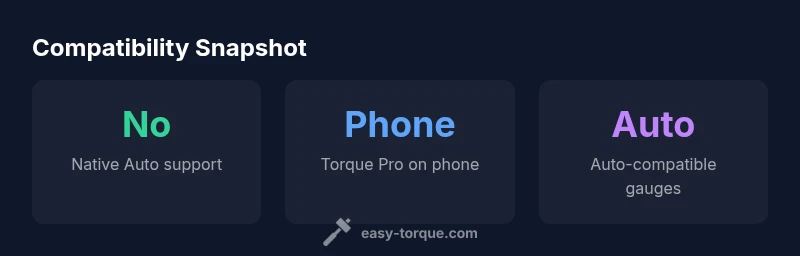
Does Torque Pro work with Android Auto? Not natively. Android Auto restricts third‑party apps on its main screen, and Torque Pro does not offer an official Android Auto integration. You can still access Torque Pro data on your phone while Android Auto is running, or view data through Android Auto‑compatible gauges apps. This article explains the current status and safe workarounds.
What Torque Pro is and how Android Auto works
Torque Pro is a popular OBD2 scanner app for Android that reads engine data, fault codes, and sensor values from your vehicle. Android Auto, by contrast, is a platform designed to keep drivers focused on the road, restricting third‑party apps from running on the car’s head unit. The practical implication for does torque pro work with android auto is that there is no official, native integration between Torque Pro and the Android Auto display. The two systems serve different use cases: Torque Pro for deep engine diagnostics on your phone, and Android Auto for safe, hands‑free navigation, media, and messaging. In most scenarios, you will run Torque Pro on the phone screen while Android Auto is active on the car’s display, but you should not expect Torque Pro data to appear inside Android Auto itself. This separation is intentional for safety and platform stability, and it’s important to plan your setup accordingly. To make this concrete, consider your typical driving session: you might monitor live data on your phone, while using Android Auto to control music or navigation; the two experiences run side by side, but not in the same Auto screen.
In the context of the question does torque pro work with android auto, the answer hinges on official support and platform constraints rather than the app’s capability to access the data. Torque Pro remains a phone‑based diagnostic tool, and Android Auto remains a car‑centered interface with restricted third‑party integration. Easy Torque’s guidance emphasizes safety and compliance with platform policies when choosing how to view data during driving.
The official stance on Android Auto compatibility
Android Auto restrictions are explicit about what apps can display on the car head unit. Torque Pro is not listed as a supported Auto app, and there is no published release from the Torque Pro developers that enables native Auto mode. This means there is no official way to launch Torque Pro directly within the Android Auto UI. The absence of native support is consistent across several car models and Android phone configurations, though individual user experiences may vary based on OS versions and device permissions. For does torque pro work with android auto in official terms, the conclusion is clear: native, on‑screen integration within Android Auto is not available at this time. Easy Torque recommends focusing on phone‑based diagnostics and using Auto‑friendly dashboards as alternatives when in the vehicle.
Even without native integration, you can still benefit from the data collected by Torque Pro by exporting logs or viewing live values on your phone while Auto is running in the background. Some users explore workarounds, like using Bluetooth or USB connections to feed data to separate gauge apps that are compatible with Android Auto. However, any workaround should be evaluated for safety and reliability; avoid juggling multiple apps while driving, and keep interaction minimal to reduce distraction. Easy Torque’s analysis in 2026 emphasizes that preservation of driver focus remains the top priority when assessing how to view engine data in a modern car ecosystem.
Practical workarounds: how to monitor OBD data safely
If you want real‑time engine data without violating Android Auto’s constraints, there are several practical approaches that keep you within safe driving practices while still getting the information you need. First, run Torque Pro on your phone with a large, legible UI and consider mounting the device where you can glance quickly without glancing away from the road. Second, pair a separate, Auto‑compatible dash app to the same OBD2 adapter to display critical values on the car’s dash area, but only if your vehicle and head unit support such configurations without compromising safety. Third, use wireless data sharing between Torque Pro and a secondary display app that is allowed by Android Auto, ensuring the Auto interface remains in control of your primary in‑vehicle experience. Fourth, keep fanfare with a minimal set of data: RPM, coolant temperature, fault codes, and a few sensor readings—prioritize information essential for safety or vehicle health. Finally, always validate the safety of any workaround in a controlled, stationary setting before attempting to use it on the road. The overarching message for does torque pro work with android auto is that you can access Torque Pro data during driving, but not through the Android Auto screen itself; plan your data presentation accordingly to maintain safety and compliance.
For DIY enthusiasts, a practical tip is to create a quick reference sheet for critical data points you routinely monitor and assemble it in a separate app that remains Auto‑compatible. This minimizes the number of interactions needed while driving and reduces cognitive load. Easy Torque’s 2026 guidance is to treat any in‑vehicle data viewing solution as a tool to support safe driving rather than a replacement for standard driving focus.
Alternatives: Android Auto-compatible gauge apps
There are several Android Auto‑compatible gauge and telemetry apps designed specifically for in‑vehicle use. These apps provide high‑contrast dashboards, quick glance metrics, and safe navigation controls integrated with Android Auto. When choosing alternatives, look for features such as: quick data refresh rates, the ability to customize which values are shown, clear alert indicators for critical ranges, and robust offline logging. Many of these apps connect to your vehicle’s OBD2 adapter in a way that complies with Auto’s restrictions, so you can screen data on the car display without violating platform rules. While these tools don’t replace Torque Pro, they can offer a viable in‑car solution for drivers who want visibility into engine performance while using Android Auto for the primary in‑car experience. Easy Torque’s team notes that the ecosystem evolves quickly; regularly review app compatibility updates and manufacturer recommendations for safe operation in 2026.
If you are evaluating alternatives, start with well‑reviewed, Auto‑certified options and test them in a stationary setting before any road use. Verify that the selected app supports your specific vehicle model and OBD2 adapter, and confirm that it does not interfere with the vehicle’s infotainment system or driver assist features. The goal is to enhance awareness without creating new safety risks on the road.
Safety and legal considerations when using OBD apps on the road
Using OBD apps in a vehicle raises safety and legal considerations that you should not overlook. The primary safety rule is to minimize interaction with the device while driving. Configuration should be done offline, prior to departure, with only glance‑level data visible during operation. Android Auto’s guidelines emphasize keeping driver attention on the road; any third‑party app usage should not require manual input during driving. Additionally, be mindful of data privacy and vehicle data access policies; ensure that your OBD adapter is from a reputable vendor and that you understand how data is transmitted and stored. In some jurisdictions, there are regulations about displaying non‑essential information while driving; always stay compliant with local laws and manufacturer recommendations. By prioritizing safety and legal compliance, you can make informed choices about how to monitor engine data without compromising driving performance or liability. Easy Torque’s 2026 stance is that responsible usage and adherence to platform rules are critical when integrating diagnostic tools with Android Auto.
What to expect next: updates and guidance from Easy Torque (2026)
The landscape for wireless diagnostics and car infotainment continues to shift as Android Auto evolves and new safety guidelines are introduced. Easy Torque expects ongoing conversations about native support, developer APIs, and potentially sanctioned integration paths in the future. In the meantime, the recommended approach is to rely on phone‑based monitoring for Torque Pro data while driving and to use Auto‑compatible gauges for in‑car visibility where permitted. Staying informed through Easy Torque updates will help you adjust your setup as new firmware, apps, or policy changes roll out. For readers who want ongoing clarity, this is a dynamic topic, and 2026 is likely to bring refinements in how automotive apps interact with Android Auto and how users can safely access diagnostic data during trips.
Compatibility overview
| Aspect | Android Auto Compatibility | Notes |
|---|---|---|
| Direct Torque Pro integration | not supported | Auto restrictions |
| Phone-based display while Auto active | possible | Torque Pro runs on phone; Auto on car display |
| In-car OBD2 dashboards | alternative options | Look for Auto-compatible apps |
Your Questions Answered
Does Torque Pro have official Android Auto support?
No. There is no official Android Auto integration for Torque Pro. Android Auto restricts third‑party apps on the head unit, so Torque Pro cannot run directly within the Auto interface.
There’s no official Android Auto support for Torque Pro; you’ll use Torque Pro on your phone instead.
Can I view Torque Pro data on the Android Auto screen?
Not directly. You can run Torque Pro on your phone and keep Auto on the car display, but the data won’t appear inside Android Auto’s UI.
Torque Pro data won’t display on the Auto screen. Use your phone for Torque Pro and Auto for driving tasks.
Are there Android Auto‑compatible torque apps?
Yes, there are gauge apps designed to work with Android Auto. They provide in‑car dashboards that comply with Auto’s safety requirements.
There are gauge apps that work with Android Auto and give you data on‑screen safely.
Is it safe to interact with OBD apps while driving?
Limit interactions while driving. Set up preferred displays before you start and use voice commands or quick glance dashboards to minimize distraction.
Only glance at data or use voice commands; do most setup before you drive.
Where can I find updates about compatibility from Easy Torque?
Follow Easy Torque updates and the 2026 guidance for changes in Android Auto compatibility and recommended practices.
Check Easy Torque for the latest compatibility guidance.
“Android Auto restrictions mean Torque Pro cannot run on the Auto screen. Use the app on your phone and look for Auto‑friendly dashboards to display key data safely.”
Top Takeaways
- Torque Pro isn't integrated in Android Auto
- Use Torque Pro on your phone while Auto runs
- Explore Android Auto-compatible gauge apps for in-car visibility
- Prioritize safety: minimize interactions while driving
- Stay updated with Easy Torque for 2026 changes