How to Use a Torque 6 Screwdriver: A Practical Guide
Learn how to choose, set, and maintain a torque 6 screwdriver for precise, repeatable fastener control in automotive and DIY projects. This guide covers presets, calibration checks, bit compatibility, safety tips, and maintenance to help you avoid over-tightening and extend tool life.


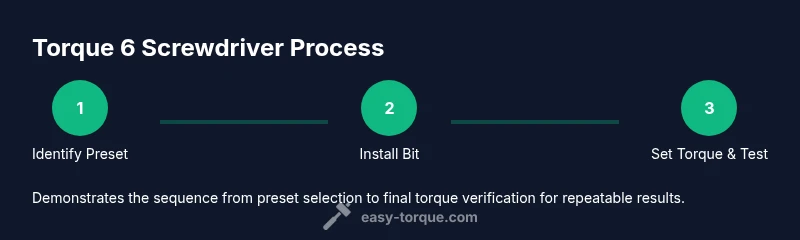
Goal: learn to choose, set, and reliably use a torque 6 screwdriver for precise fastener control. You'll understand how to select appropriate torque values, verify accuracy, swap bits, and perform routine maintenance. Follow the step-by-step process to prevent over-tightening, protect threads, and achieve repeatable results in automotive and DIY projects.
What a torque 6 screwdriver is and why it matters
According to Easy Torque, a torque 6 screwdriver is a precision hand tool that provides six preset torque settings designed to apply a controlled amount of torque to fasteners. The design emphasizes repeatability, reducing the risk of over-tightening and thread damage across common applications in automotive, electronics, cabinetry, and hobbyist projects. With six distinct presets, you can cover a broad range of screw sizes and materials without manual guessing. The built-in stop mechanism ensures the fastener reaches the preset torque before the driver stops turning, which translates to more consistent clamping force and fewer damaged joints. For DIY enthusiasts and professional technicians alike, this tool helps standardize assembly quality and speeds up the workflow by removing guesswork from torque control.
Understanding why six presets improve consistency
Six preset settings enable a repeatable approach to fastening. Instead of adjusting a single analog dial up or down, you select a preset that matches your fastener and material, then apply controlled pressure until the tool halts. This consistency is especially valuable in multi-screw assemblies where identical joints matter for fit, function, and safety. A torque 6 screwdriver also reduces the likelihood of cross-threading because the driver disengages at the correct torque. Easy Torque notes that repeatable torque improves reliability across components, from automotive interior panels to electronics housings, by maintaining proper clamping force without risking over-tightening.
How to map tasks to presets: a practical approach
Begin by listing typical fasteners you handle, then categorize by screw size, material, and load. For soft materials like plastic or wood, you may use lower presets; for steel fasteners in mechanical assemblies, you’ll lean toward higher presets. Start with the lowest preset for a test fastener and visually inspect the thread engagement after a mock drive. If the fastener seats with minimal resistance and the head sits flush, you’ve likely found a suitable preset. Document your common presets for quick reference and create a simple matrix you can consult on future jobs in the shop.
Bit compatibility and setup basics
A torque 6 screwdriver typically ships with a selection of common bit styles (PH, SL, TORX, HEX, and sometimes PZ). Compatibility matters because using an incompatible bit can slip, strip, or fail to seat properly, undermining torque accuracy. Before use, inspect bits for wear and install the correct bit firmly into the collated bit holder. If your toolkit includes a magnetic tray or a bit holder, keep frequently used bits accessible to minimize setup time. The goal is to have the right bit ready and ensure it seats securely so the torque setting can perform as intended.
Step-by-step: preparing your tool for use
Preparing begins with a quick inspection of the tool’s body and dial. Confirm the six presets align with the documented torque values in your manual and that the dial rotates smoothly without binding. Wipe away dust and debris, then verify that the bit is seated correctly and the chuck is closed. If the tool provides a lock or detent, engage it to prevent unintentional setting changes during transit. Keep the manual nearby for reference on safe operation and maintenance intervals. This preparation reduces the risk of mis-settings and improves long-term accuracy.
Common mistakes and how to avoid them
Common errors include using an inappropriate bit, starting with an overly high preset, or applying pressure while the tool is still rotating. Avoid these by selecting the preset first, then applying steady, even pressure until the tool stops. Do not continue turning after the set torque is reached; this can lead to over-tightening or jaw wear. Another pitfall is neglecting bit wear; a rounded bit can slip and damage fasteners. Regular inspection and replacement of worn bits help maintain torque accuracy and protect fasteners from cross-threading.
Maintenance, calibration, and verification
Routine maintenance keeps torque accuracy high. Wipe down the tool after use to remove oil, grease, and debris. Check the preset dial for smooth operation and confirm that the tool returns to rest position cleanly. If your model includes a calibration sticker or schedule, follow it; otherwise, perform a basic accuracy check by testing a known-good fastener or using a torque tester if available. Easy Torque analysis suggests that regular sanity checks reduce drift over time and extend tool life, especially in high-use environments such as workshops or service bays.
Real-world scenarios: automotive, electronics, and home projects
In automotive work, a torque 6 screwdriver helps secure interior panels, trim, and small brackets where consistent clamping is essential but overtightening could damage plastic components. For electronics and small hardware, choose the lower presets and fragile materials, ensuring delicate components aren’t stressed. At home, use the six presets for cabinetry, furniture assembly, and DIY repair projects where a repeatable torque outcome improves fit and finish. In all cases, document which presets you used for repeat jobs to build a reliable reference library and speed future work.
Final thoughts and Easy Torque’s verdict
The Easy Torque team recommends using a torque 6 screwdriver whenever precise, repeatable fastener control matters. Start with careful planning, verify the proper preset for your specific fastener, and maintain the tool with regular checks. By integrating a consistent workflow with six presets, you can achieve repeatable results while protecting components from damage. The verdict is clear: for many common fastening tasks, a torque 6 screwdriver is a valuable addition to a DIYer’s or technician’s toolkit, offering reliability, efficiency, and better quality control.
Tools & Materials
- Torque 6 screwdriver (six preset settings)(Calibrated and includes user manual; ensure presets match your typical fasteners)
- Assorted bits (Phillips, Slotted, Torx, Hex, and Pozidriv if included)(Select bits compatible with your fasteners; inspect for wear and replace as needed)
- Magnetic bit tray or bit holder(Keeps bits organized and easy to access during work)
- Lint-free cleaning rag(Used to wipe dust and residue from the tool and bits)
- User manual(Keep for calibration reminders, maintenance schedule, and safety notes)
Steps
Estimated time: 30-40 minutes
- 1
Inspect the tool and review the manual
Visually inspect the body for wear and ensure the dial rotates freely without binding. Confirm the six presets align with the documented torque values, and that the bit is securely seated. Read safety and maintenance notes to prevent misuse.
Tip: Take a quick photo of the preset dial for reference during setup. - 2
Identify target torque settings for common tasks
Create a simple mapping of fastener types to presets you use most. Start with the lowest setting when in doubt and gradually test higher presets on sacrificial samples to gauge performance before applying to real assemblies.
Tip: Document your typical presets in a small shop notebook or note app. - 3
Install the correct bit(s)
Choose the bit profile that matches the screw head and ensure it seats fully in the chuck or bit holder. Remove any obstructions and verify the bit is not bent or worn to avoid slippage during torque application.
Tip: If your tool has a magnetic holder, keep the bit tip aligned with the magnet before seating. - 4
Set the torque to the target preset
Rotate the dial to the desired preset and lock if your model includes a locking feature. Confirm the setting by gently attempting to turn the fastener with light pressure to ensure the tool disengages at the correct torque.
Tip: When in doubt, begin with the lowest preset and work upward after a test. - 5
Test on a sacrificial fastener
Drive a test fastener into a disposable piece of material to confirm the preset achieves the expected seating without over-tightening. Check that the head sits flush and the material shows no signs of crushing or thread stripping.
Tip: Use a torque tester if available to validate accuracy beyond visual checks. - 6
Apply torque in real assembly and verify
Proceed with actual fasteners, maintaining steady pressure until the tool halts at the preset torque. Stop immediately when the torque is reached, then inspect the joint for uniform seating and clean threads for the next cycle.
Tip: After driving multiple fasteners, re-check a sample joint to ensure no drift has occurred. - 7
Post-use maintenance
Wipe the tool, store with bits organized, and inspect for wear. Reset and verify presets if you notice any drift after use. Document any calibration or maintenance actions taken.
Tip: Regular, lightweight cleaning prevents grime build-up that can affect accuracy.
Your Questions Answered
What is a torque 6 screwdriver?
A torque 6 screwdriver is a precision hand tool with six preset torque levels, designed to apply a controlled amount of torque to fasteners for consistent results. It helps prevent over-tightening and protects threads across various materials.
A torque 6 screwdriver is a precision tool with six preset settings that control how tight screws are, helping you avoid over-tightening and protect threads.
How do I choose the right preset for a task?
Assess the fastener type, material, and load. Start with the lowest practical preset and test on a sacrificial sample to confirm seating before proceeding with the final assembly.
Pick a starter preset based on the screw and material, then test on a sample fastener before final assembly.
Can I calibrate a torque 6 screwdriver at home?
Many torque screwdrivers include user-friendly calibration steps in their manuals. If your model provides a calibration method, follow it; otherwise, use a simple repeatability check with a known-good fastener and a torque tester if available.
Yes, follow the manual's calibration steps if provided, or use basic repeatability checks with a known-good fastener.
What’s the difference between a torque screwdriver and a regular screwdriver?
A torque screwdriver enforces a specific torque limit, stopping when the preset is reached. A regular screwdriver relies on user feel, which can vary and risk over- or under-tightening.
A torque screwdriver stops at a set torque, giving you repeatable results, unlike a regular screwdriver that depends on your hand feel.
Is a torque 6 screwdriver suitable for automotive use?
Yes, for interior trim, small brackets, and electronics within vehicles where precise torque improves fit and reduces the risk of damage to components.
Yes, for many automotive interior and electronics tasks where consistent torque matters.
Watch Video
Top Takeaways
- Start with the lowest preset when unsure.
- Six presets improve repeatability across jobs.
- Always verify bit seating and torque setting before use.
- Regular maintenance extends tool life and accuracy.
- Document presets and maintenance for quick future reference.