Torque vs Force Calculator: Learn How Torque Converts to Linear Force
Explore how a torque vs force calculator converts rotational torque to linear force, with practical steps, examples, and a ready-to-use calculator for DIY and automotive work.


Why a torque vs force calculator matters
In mechanical work, understanding the relationship between torque and linear force is essential. A torque vs force calculator helps DIY mechanics, automotive enthusiasts, and technicians translate a turning moment into the straight-line force that acts at the end of a lever or fastener. This is especially valuable when you’re selecting a wrench size, judging whether a clamp will hold, or evaluating whether a bolt preload meets a specification. By providing a quick, repeatable way to map rotational effort to a measurable force, the calculator reduces guesswork and improves consistency across tasks ranging from lug-nut torques to machinery assembly.
According to Easy Torque, thinking in terms of both torque and force helps you plan tool choices more accurately. The calculator makes it easy to compare two scenarios: a longer lever that applies more force at a given torque, and a gear-driven arrangement that amplifies or diminishes that force. In practice, you’ll appreciate how small changes in radius or gearing produce noticeable shifts in end-effector force. This section will explore the core concepts and typical workflows, so you can start using the calculator with confidence in automotive and home maintenance projects.
The physics behind torque and force
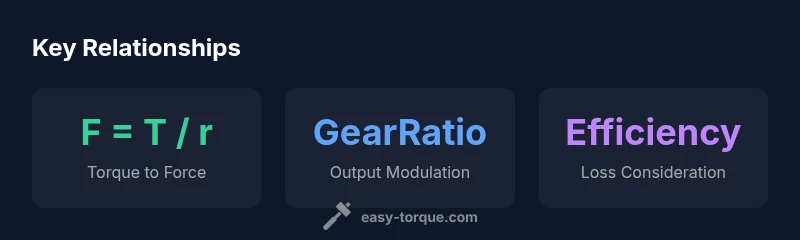
Torque is the turning moment generated by a force acting at a distance from a pivot. The fundamental relationship is T = F × r, where T is torque, F is linear force, and r is the lever arm radius. To convert torque back to a force on a straight line, rearrange the formula: F = T / r. When a gearing system is involved, the effective force at the output changes by the gear ratio and efficiency: F_out = (T × gearRatio × efficiency) / r. All quantities should be expressed in compatible units, typically newton-meters for torque, meters for radius, and newtons for force, to obtain results in newtons.
In practice, a torque wrench applies a known torque at a given radius. If you change the lever length, the force exerted at the bolt changes proportionally. Gear systems, like torque multipliers or wrenches with reducing gear, adjust that force again, sometimes dramatically. While the calculator handles these relationships, it’s important to recognize real-world factors such as friction, lubrication, and thread engagement, which mean the actual preload may differ from the calculated ideal. This section sets the foundation for accurate inputs and meaningful results in your projects.
Units, precision, and common pitfalls
Choosing the right units is critical. The standard SI set uses newton-meters for torque, meters for radius, and newtons for force. Mixing in imperial units (lb-ft, inches) is possible but requires careful conversion to avoid errors. The calculator’s simple formula assumes a direct lever arm and ignores losses from friction, stiffness, and material deformation. For precision tasks, measure the actual lever radius from the pivot to the line of action, not just the wrench length. Even small measurement mistakes grow into large errors in force estimates.
Another common pitfall is assuming the ratio or efficiency stays constant under load. Real systems experience changes in friction and contact conditions as torque varies. When you include gear ratios, double-check that the ratio is appropriate for the tool’s input shaft and the output mechanism. Finally, remember that the goal is safe, repeatable performance, not chasing a theoretical number.
Practical DIY scenarios: automotive, machinery, and home projects
This calculator shines in everyday tasks. For automotive work, you can estimate the clamping or preload at a lug nut or a sensor bolt by translating the torque specification into a contact force at the bolt head. In machinery assembly, it helps you compare a long-handled wrench versus a compact lever, or a hand tool against a powered driver, to understand how much end-force you’ll apply. Home projects such as securing a shelf or mounting hardware can benefit from quick checks of whether your chosen fastener will reach the required clamping force without overtightening. In all cases, use the calculator to test different radius and gearing scenarios before applying tools, then cross-check with manufacturer torque specs and safety margins.
How to configure the calculator: inputs and formula
The calculator uses four inputs to model torque-to-force conversion: Torque (Nm), Lever Radius (m), Gear Ratio (dimensionless), and Efficiency (dimensionless). The core formula is: outputForce = ((torqueNm / radiusM) * gearRatio) * efficiency. A torque value of 50 Nm with a 0.05 m lever radius, a 2x gear ratio, and 90% efficiency yields an estimated output force in newtons. This setup mirrors many common hand-tool configurations, including adapters and simple gear reductions. The calculator’s defaults are chosen to illustrate typical tasks, but you can adjust them to match your tools and conditions. Remember to verify the final result against service manuals and safety guidelines before performing any work.
Interpreting results and applying them safely
Results are a model of the idealized relationship between torque, radius, gearing, and efficiency. Treat the output as an estimate, not an exact measurement. Use safety margins, especially for critical fasteners and load-bearing components. When possible, corroborate the calculated force with a measured bolt preload using a torque-angle method or a calibrated tool. If the calculated force seems unexpectedly high or low, re-check your inputs: radius measurement, gear ratio alignment, and whether efficiency should be adjusted for lubrication or thread friction. Finally, consider environmental factors such as surface condition, temperature, and vibration, all of which can influence actual performance.
Practical tips for accuracy and optimization
- pro_tip: Always measure the radius to the true line of action, not just the tool’s overall length. This improves accuracy dramatically.
- warning: Do not exceed the manufacturer’s torque specifications; higher force can cause bolt stripping or thread damage.
- note: Include friction and lubrication considerations; real preload often differs from the ideal calculation.
- pro_tip: Use the calculator to compare setups (longer lever vs gearing) before starting the job to choose the safer, more efficient approach.